Showing posts with label Digital Quick Paint. Show all posts

Monday, July 14, 2025

Superman: Super Grover

SUPERMAN:
Super Grover

He is faster than lightning, stronger than steel, and smarter than a speeding bullet--Oh, and he's cute, too!  Look, up in the sky!  It's a bird!  It's a plane!  It's (said disappointedly after he crashes) Super Grover...

Yes, that's right, it was one of my favorite segments as a kid watching "Sesame Street" because, y'know, it involved Super-Heroes.  I figured it was a fun way to end the unofficial Superman Week.

* * * 

STEP ONE:  Here are the really quick, first pass with digital paint, done on a 2,000px x 3,000px @ 300dpi fine Gesso canvas in Rebelle 7.  Once again, I used the Oil Palette Knife brush rather than the Oil Filbert Brush.

* * *

STEP TWO:  Here it is a little further along and more blended.

* * *

STEP THREE:  And here's the finished digital painting.

* * *

Done digitally in Rebelle 7

.

Sunday, July 13, 2025

Superman: Superman (2025) with David Corenswet

SUPERMAN:
David Corenswet

Of course I went and saw "Superman" (2025) the opening night, and I thought it was generally a great movie.  People have described it as the most comic book of comic book movies and I will agree with an emphatic "Hell, yeah!"

Lois Lane and Jimmy Olsen were perfectly cast; Mr. Terrific was, well, terrific; Guy Gardener was exactly what you would think he would be; Hawkgirl was fun for the little bit she was in the movie; Lex was just a straight up villain; Jonathan and Martha Kent were perhaps dialed up a bit too much on the corn pone level but were still good people who raised a good son.  Krypto was also great fun (the part with Superman looking for Krypto and saying "He's not even that good of a dog" amused me, but he kept looking).

David Corenswet is a great Superman (so was Henry Cavill, but I felt he was failed by the dour story in which he was placed).  Gunn really got Superman right for the screen--and this is probably the best Superman alongside Christopher Reeve, full of hope, kindness, and there always being a way--although there were a few story plot points which rubbed me the wrong way (particularly the motivating action of the movie involving a Kryptonian video--I'll leave it at that).

Overall, I enjoyed it, had fun, found the funny parts funny, enjoyed the action and easter eggs; there were a couple plot points that I didn't care for, but those were mentally put aside for the good time and good vibes I had for the rest of the movie.

Hmmmm, one more digital Quick Paint and it would be a full week/seven pictures.  Ah, I have an idea related to Superman that should tie everything together.  Well, probably not that far, but it will amuse me (and hopefully y'all) nonetheless.  Stay tuned for tomorrow to see how we end this Super-Week!

* * * 

STEP ONE:  Here are the really quick, first pass with digital paint, done on a 2,000px x 3,000px @ 300dpi fine Gesso canvas in Rebelle 7.  Once again, I used the Oil Palette Knife brush rather than the Oil Filbert Brush for those of you who are curious.

* * *

STEP TWO:  Here it is a little further along and more blended.  After a little while, I realized that I had the face a little off, so I did some quick Selecting and moving around--moved the face up here, shortened the nose a bit there, and then did some more blending and painting to fix it.

* * *

STEP THREE:  And here's the finished digital painting.  Once again, I was a bit too quick on the draw (heh, pun!) and should have corrected the placement of the eyes/nose/mouth much earlier, rather than rushing into the fun stuff, building up the shading on the face, trying to finish as soon as possible, etc.  There's a lesson in there that I am sure I will fail to heed.  But, I did get mostly there in the end... mostly.  Then again, these are just Quick Paints, so won't be perfect.

* * *

Done digitally in Rebelle 7

.

Friday, July 11, 2025

Superman: Superman: The Movie (1978) with Christopher Reeve

SUPERMAN:
Christopher Reeve

Ah, "Superman: The Movie" (1978).  The tagline was "You will believe a man can fly," and while I wouldn't go that far, it had a profound effect on me watching it as a kid.  Superman is a truly totemic character to me--probably to an embarrassing amount--and this movie fully captured the inherent kindness and humanity to Superman as I understand the character and will always compare to other versions of Superman.  Of course he's an absolutely wholesome, big Blue Boy Scout and goody-two-shoes who will try to help everyone: He's Superman.

The sequel, "Superman II" (1980), was pretty great, as well, but I overlooked the silly, "Three Stooges" slapstick comedic parts Lester directed which really stand out like a sore thumb when I watch it today.  Ah, well, it's a good enough movie to overlook it.

Needless to say, the quality of the Christopher Reeve movies went down sharply thereafter, but let's not talk about that...

* * *

STEP ONE:  Here are the really quick, first pass with digital paint, done on a 2,000px x 3,000px @ 300dpi fine Gesso canvas in Rebelle 7.  This time, I used the Oil Palette Knife brush, rather than the Oil Filbert Brush for those of you who are curious.

* * *

STEP TWO:  Here is the digital painting a little further on.  Mostly, it was just blending and adjusting what was laid down in the First Step.  I realized that the chin was creeping into Frank Quietly territory, so I lassoed it and moved the face down a bit.

* * *

STEP THREE:  After moving the face down, that seemed to correct something which was nagging my subconscious when doing the painting.  It mostly looked alright and seemed correct, but there was something about it which was making my Spidey-Sense tingle, if you will forgive me mixing my comic book franchises. 

* * *

Done digitally in Rebelle 7

.

Thursday, July 10, 2025

Superman: Adventure of Superman with George Reeves (1952 to 1958)

SUPERMAN:
George Reeves

Now it's the ubiquitous Superman of my childhood.  Every once in a while, it would be syndicated on a local channel and I would get to catch some of the episodes of "Adventures of Superman".  Reeves version of Superman was more square-jawed and avuncular.  As cool as it was to see Superman on the small screen, I was always disappointed he wasn't able to battle the villains from the comic books.  Instead, it was Superman fighting other middle-age men in suits... Granted, they are probably the true bad guys in society, but I wanted to see his fighting Brainiac, Mr. Mxyzptlk, and assorted aliens and monsters.  Granted, I was a dumb kid with no understanding of TV Budgets or Special Effects limitations of the time (as opposed to now when I'm a dumb adult with only a marginal understanding of TV Budgets or Special Effects limitations).

Still, it was from a time when beggars couldn't be choosers when it came to super-hero fare on the ol' television, and I took everything I could get.

* * *

STEP ONE:  Here are the really quick, digital pencils, done on a 2,000px x 3,000px @ 300dpi fine Gesso canvas in Rebelle 7.

* * *

STEP TWO:  Here's the colors done under the pencils, which I duplicated and merged down onto a single layer.  I then duplicated the Layer to preserve it for the "Work in Progress", and started working over the digital pencils/paints.

* * *

STEP THREE:  And here's the finished digital painting, done with lots and lots of back-and-forth and blending.  Mostly, it was done on a single layer, with an occasional added one which was then merged down, as well.

I realized that the nose was a bit short and the shape of the head should have been a bit more square.  It's another example of a 1/4" here and the 1/8" there (that a .6cm to .3cm to those of you who use metric) can make a real difference as to how a picture turns out.  Onward to the next one or two!

* * *

Done digitally in Rebelle 7

.

Wednesday, July 9, 2025

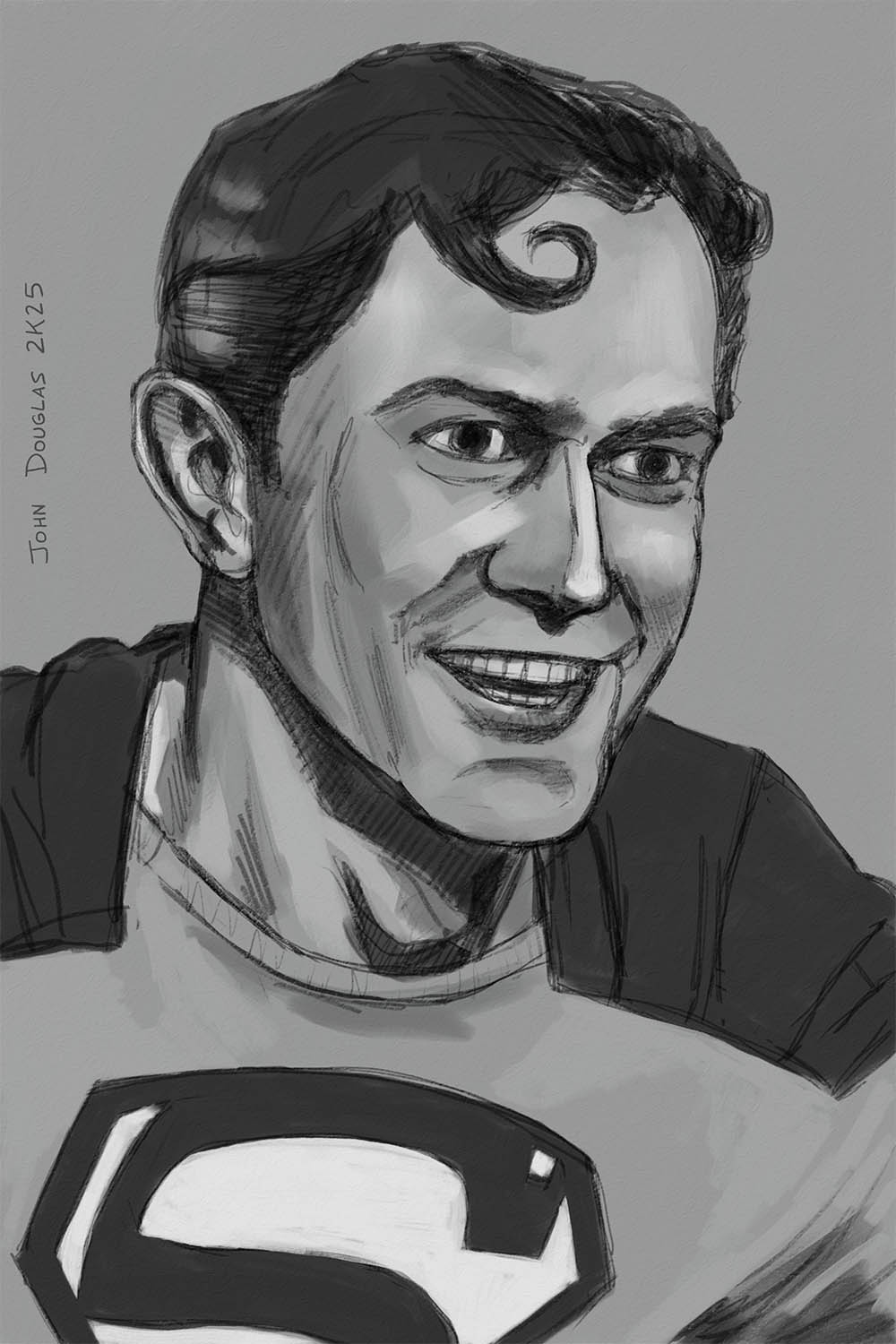
Superman: Serials with Kirk Alyn (1948)

SUPERMAN:
Kirk Alyn

It's time for another Superman digital painting, this time it is the Kirk Alyn from the first "Superman" Serial from 1948.  I've only caught a few of the black-and-white serials over the years, but Alyn always seemed like a happy-go-lucky, smiling, and ebullient version of Superman, which is how I always picture him in my mind's eye.

* * *

STEP ONE:  Here are the digital pencils, done on a 2,000px x 3,000px @ 300dpi fine Gesso canvas in Rebelle 7.

* * *

STEP TWO:  Here's a quick black-and-white value study under the pencils, which I duplicated and merged down on the value painting.

* * *

STEP THREE:  And here's the finished digital painting, done with lots and lots of back-and-forth and blending.  Mostly, it was done on a single layer, with an occasional added one which was then merged down, as well.

* * *

Done digitally in Rebelle 7

.

Monday, April 14, 2025

Tron: Legacy (2010) - Gem - Digital Quick Paint

Tron: Legacy (2010)
Gem

It's yet another "Tron: Legacy" (2010) Quick Paint, this time for Gem (who may or may not be a hard-light hologram... [Insert "Jem and the Holograms" pun here].  She was another character that compelled my attention when she was on screen--something striking about her appearance... or, maybe it was just the contrast of the white costume with the dark backgrounds of The Arena.  Again, nothing to do with a skin-tight catsuit with glow sticks on it.

I am hesitant to call this one a "Quick Paint", as this one took a bit more time, but here we are (alas, whenever I start with something like this, the first one is a couple-a-few hours, and then the amount of time begins to increment up and almost doubles and doubles again, etc.).  Also, it didn't help that I had to do a lot of back-and-forth to get everything in the correct proportions.  I was guilty of rushing the layout so I could get on with the fun of the painting the character, Gem, but then spent a lot of time just fixing the proportions I should have corrected before I started getting serious on the actual Digital Painting.  Ah, well.

And, yes, I broke out the Light Pen just to use the Light Pen for the sake of it being a "Tron" pic.

* * *

STEP ONE:  Here is the quick layout, done in Procreate on a 2,000px x 3,000px canvas @ 300dpi, done in Procreate with a Conte Brush.

* * *

STEP TWO:  And here it is a little further along.

* * *

STEP THREE:  And the finished pic, for better or worse.  I did some Adjustment Layers in Procreate, and then a slight color correction in Photoshop to warm up the colors a little bit more.  The color looked good in Procreate, but were nearly absolutely blue on my other screen (it's not color calibrated or anything fancy like that).

* * *

Done digitally in Procreate on an iPad (with a slight assist from Photoshop for some minor color correction).

.

Sunday, April 13, 2025

Tron: Legacy (2010) - Quorra - Digital Quick Paint

Tron: Legacy (2010)
Quorra

I'm still just goofing around with Procreate and having fun with the Tron series, so it's another Digital Quick Paint with Tron: Legacy (2010).  Olivia Wilde as Quorra was a sleek, cool character that I've always been meaning to draw/paint.  She was absolutely magnetic on screen, IMHO, and I'm reasonably sure the skin-tight leather light suit had very little to do with it.

That said, I will probably just do one or two more "Tron" themed ones and move on to whatever else catches my eye,  next.

* * *

STEP ONE:  Here is the quick layout, done in Procreate on a 2,000px x 3,000px canvas @ 300dpi, done in Procreate with a Conte Brush.

* * *

STEP TWO:  And, since I wasn't paying attention and forgot to save one of the mid-steps, here's the finished pic.

* * *

Done digitally in Procreate on an iPad.

.

Saturday, April 12, 2025

Tron: Legacy (2010) - Flynn - Digital Quick Paint

Tron: Legacy (2010)
Flynn

I'm having fun with the Tron series, so it's another Digital Quick Paint, this time for the sequel, Tron: Legacy (2010).  It's in like Flynn, with Jeff Bridges doing the Bio-Digital Dude, man.

"Tron: Legacy" was far more visually striking, showing how far digital effects have come; it's the move up from the Atari 2600 of my youth and to the latest X-Stations and Play-Boxes of the kids today.  I always had a soft spot for the Tron franchise, and I thought "Tron: Legacy" was pretty good and had great special effects.

Alas, I didn't get to use the Light Pen in Procreate.  Aw, well, maybe next time...

* * *

STEP ONE:  Here is the quick layout, done in Procreate on a 2,000px x 3,000px canvas @ 300dpi, done in Procreate with a Conte Brush.

* * *

STEP TWO:  And here it is a little further along.

* * *

STEP THREE:  And the finished pic, for better or worse.

* * *

Done digitally in Procreate on an iPad.

.

Friday, April 11, 2025

Tron (1982) - Sark - Digital Quick Paint

Tron (1982)
Sark

It's another Digital Quick Paint from the original "Tron" (1982).  This time it is Sark (SARK-ES-1117821), the Second in Command to the bad guys, but he was more visually interesting to me than the Master Controller Program, IMHO.  Again, just goofing off in Procreate and figured I'd post it.

* * *

STEP ONE:  Here is the quick layout, done in Procreate on a 2,000px x 3,000px canvas @ 300dpi, done in Procreate with a Conte Brush.

* * *

STEP TWO:  And here it is a little further along.

* * *

STEP THREE:  And the finished pic.  I used the Light Pen in Procreate to do the Light Effects on the costume.  Once again, I went a little overboard, but didn't completely over do it like the last one.

* * *

Done digitally in Procreate on an iPad.

.

Thursday, April 10, 2025

Tron (1982) - Flynn / Clu - Digital Quick Paint

Tron (1982)
Flynn / Clu

Hey, hey, the other day they dropped a teaser trailer for "Tron: Ares" and I figured what better time to do a series of digital quick paints for "Tron" and "Tron: Legacy", why not?

The original "Tron" (1982), while revolutionary for its time for visual effects, is rather slow-moving and mostly on the dull side through today's eyes, however, there is something within that I find compelling about it.  There are bits (and bytes!) that are more clever than they should be, and the late, great Syd Mead's digital designs are amazing.  I do have a warm fondness for the series, nonetheless.

* * *

STEP ONE:  Here is the quick layout, done in Procreate on a 2,000px x 3,000px canvas @ 300dpi.  Some marginal noodling around with some oil-style brushes I got to play around with and see how well they worked.  They are OK, but not quite what I was looking for (alas, the curse of most brushes--when will I learn it is not the tools, per se, but the practice that is more important?  And why is the answer to that question NEVER?).

* * *

STEP TWO:  And here it is a little further along.   Shortly after this point, I decided to use a Conte Chalk Brush, instead.

* * *

STEP THREE:  And the finished pic.  I used the Light Pen in Procreate to do the Light Effects on the costume.  I will admit, that pen works pretty slick when it comes to making it look like illuminated, neon lighting on the costuming.  And, yeah, I admit that I went a little overboard with the lighting on the helmet for no apparent reason.

* * *

Done digitally in Procreate on an iPad.

.

Friday, December 16, 2016

Digital Quick Paint - K-2SO

K-2SO


In honor of "Rogue One: A Star Wars Story", here's a digital quick paint of one of my favorite characters from the movie: K-2SO, a reprogrammed Imperial Droid.  His deadpan delivery and steady sarcasm made him one of my favorite characters in the movie.

I won't give any spoilers, but "Rogue One: A Star Wars Story" really put the "War" in "Star Wars".  There are quite a few Easter Eggs and surprise cameos scattered throughout the movie, and the last 5-10 minutes of the movie will bring an excited glee of recognition to the hearts of any "Star Wars: A New Hope" fan.  I'll give it 4-1/2 out of 5 Kyber Crystals.

I suppose "quick paint" is a relative term, as this was done over the course of 2-1/2 hours or so.

* * *


STEP ONE:  Here is the quick digital pencils and color layout on a 900px x 900px canvas.

* * *


STEP TWO:  Well, I guess I could have put in a few more in-between steps...  Oh, well.  In the background, I just used a textured brush to to give the illusion of a sandstone type surface.  From there, I built up the colors on K-2SO, trying to make him look like a matte, gun-metal surface with light and shaded areas, and built toward refining the details.  I would have liked to run another pass over the drawing to fix his collar area and fill in a few more details, but unfortunately ran out of time and so had to call it "Good 'nuff".  

* * *

Done digitally in Photoshop.

.