Sunday, February 14, 2016

Unwanted Valentines: Collected

Happy Valentine's Day!
Or, as I like to call it, "Happy V.D."  

Just because I've been doing these over the course of a several years, here are all the "Unwanted Valentines" together in one post, for convenience.  And it gives me a cheat for an extra post this month so I don't look like a completely lazy bum!  So, it's a two-fer -- everybody wins!

(Click on a picture to embiggen!)


Face-Hugger -- By far my most popular "Unwanted Valentine".  Last year, it was even re-posted on Drowning Pool's Facebook page.  So, that was cool!

* * *


Two comic book based Valentines: Marvel Comic's Man-Thing and DC/Vertigo's "Flex Mentallo".  These were originally done for the iFanboy website as part of one of their contests.  I won a couple graphic novels out of it.  Hooray!

* * *  


Two from John Carpenter's "The Thing": "Split-Face" and "Crab-Head"

* * *
Based on "Mars Attacks", of course

* * *


Blaine the Mono from Stephen King's "Dark Tower" series, mashed-up with "The Simpsons" Ralph Wiggum's "I Choo-Choo-Choose You" card.

* * * 


The Pale Man from "Pan's Labyrinth"

* * *


 It's Roy Batty and Pris from "Blade Runner"

* * *


And Immortan Joe from "Mad Max: Fury Road" being all creepy and stalkery

* * *

Also, if you will forgive a little bit of cross-promotion, my thanks to Mike from Xombie-DIRGE and Jim from JimSmash!.  They were kind enough to feature posts of my work on their Blogs, and I thank them! :-)

.

Friday, February 12, 2016

Unwanted Valentines: Immortan Joe

Unwanted Valentines:
Immortan Joe


And, an alternate one:


These Unwanted Valentines feature Immortan Joe, from "Mad Max: Fury Road".  I really liked the movie: it was visually arresting, moved along at a good clip, and had lots of good action pieces.  The story was very simple (we're driving this way, now back again), but I don't see anything wrong with that for a fun, action movie.  And, I have to say that 70-year-old director George Miller's visual sense in the movie was so dynamic and amazing, it seemed better than most directors half his age.

For the Valentines, I wasn't sure which wording I preferred, as both seems creepy enough to fit the character.  So, when I came to that fork in the road, I took it and did both.  Also, I didn't have time to do a second Immortan Joe drawing before Valentine's Day, so I just used the same one; I feel a little guilty about that.  Oh, well.  C'est Le Vie and all that jazz.

* * *


STEP ONE:  Here are the quick, digital pencils on a 1,000px x 1,400px canvas at 200dpi.

* * *


STEP TWO:  Digital inks done mostly with a 5pt. Hard Round brush.

* * *


STEP THREE:  Colors were done over a Multiply Layer, and the lettering was added.

* * *

Done digitally in Photoshop.
.

Wednesday, February 10, 2016

Unwanted Valentines: Pris

Unwanted Valentines:
Pris


Another Unwanted Valentine based on "Blade Runner", in this case Priscilla Stratton, A.K.A. "Pris".  She was labelled as a "Basic pleasure model" on the screen used to show Deckard the escaped replicants, and activated on February 14, 2016.  So, Happy Birthentine to Pris?  Ugh, there's a portmanteau/neologism I guarantee will go to this paragraph and no further.

* * *


STEP ONE:  Here are the digital pencils on a 1,000px x 1,400px canvas at 200dpi.  Again, this was just as a quick sketch to put in the general layout.

* * *


STEP TWO:  Digital inks done mostly with a 5pt. Hard Round brush.

* * *


STEP THREE:  Colors were done over a Multiply Layer, and the lettering was added.

* * *

Done digitally in Photoshop.
.

Tuesday, February 9, 2016

Unwanted Valentines: Roy Batty

Unwanted Valentines:
Roy Batty


I'm a HUGE fan of "Blade Runner"--the movie, more so than the book, "Do Androids Dream of Electric Sheep", by Philip K. Dick.  The book is pretty good, but the movie just pulls my attention every time and I find it superior to the novel it's based upon.  I find it mildly ironic, since I almost always prefer the book to the movies.  For example, to use another Philip K. Dick work, I don't care for "Minority Report" the movie because the book/novella was perfect in the way it dealt with the contradictions made by the Precogs, and had a sense of paranoiac dread that I thought was lost in the transition to screen.

I missed Roy Batty's "birthday" last month (activated on January 8, 2016 according to the movie), so here's a Valentine about him, instead.

* * *


STEP ONE:  Here are the digital pencils on a 1,000px x 1,400px canvas at 200dpi.  Just a quick sketch to put in the general layout.

* * *


STEP TWO:  Over the digital pencils go the digital inks, don'cha know.  Mostly done with a 5pt Hard Round brush.

* * *


STEP THREE:  On a new Multiply Layer I put in the colors, and finished it off with the lettering featuring a fairly terrible pun.

* * *

This was done digitally with Photoshop

.

Thursday, February 4, 2016

Unwanted Valentines: Pan's Labyrinth

Unwanted Valentines:
Pan's Labyrinth


It's time again for those heart-shaped blights to your eyes, Unwanted Valentines!

In this case, it is based off The Pale Man from "Pan's Labyrinth".

* * *


STEP ONE:  Here are the digital pencils.  I just did a really quick, loose digital drawing.

* * *


STEP TWO:  And the digital inks done mostly with a 5 point Hard Round brush.

* * *


STEP THREE:  And here is the colored image.  I then added lettering, above, and called it DONE!

* * *

This was done with Photoshop.

.

Wednesday, January 27, 2016

OMAC (One Man Army Corps)

O.M.A.C. (One Man Army Corps)


I know I've spoken before about my extreme fondness for the Kirby created, Mohawk-wearing warrior of tomorrow, O.M.A.C. (One Man Army Corps), and even use the Charles M. Schultz mash-up of O.M.A.C. for my avatar both here and at work.  Originally, I was going to use O.M.A.C. for a New Year's picture, with the iris/pupil "O" in the eye on his chest being the "0" in 2016, but his expression seemed a little on the serious side, so I decided to move it to later in the month.  I'm sure I will be doing more with O.M.A.C. in the future.

However, there is something about my drawing of his Mohawk while looking at it straight on that sort of bothers me.  It reminds me of something... I can't quite put my finger on it.  Oh, wait, I think I know what it reminds me of...


OH, NO!  NOT THAT!  ANYTHING BUT THAT!

Sigh...  Oh, well.  For those interested, here are the steps in drawing.  

(NOTE: While I really like "Fifth Element", Chris Tucker's character, DJ Ruby Rhod, is SUPER annoying.)

* * *


STEP ONE:  Here are the digital pencils on a 1,000px by 1,400px canvas at 200dpi. 

* * *


STEP TWO:  Here is the grayscale laying out the general form, as well as some of the light and shadows.

* * *


STEP THREE:  I cut out the figure and did the background, and then did the flat colors over a MULTIPLY Layer.

* * *


STEP FOUR:  I added the final highlights and shadows over the flat colors, and painted over top of everything with several Normal Layers.

* * *

This was done with Photoshop.

.

Wednesday, January 20, 2016

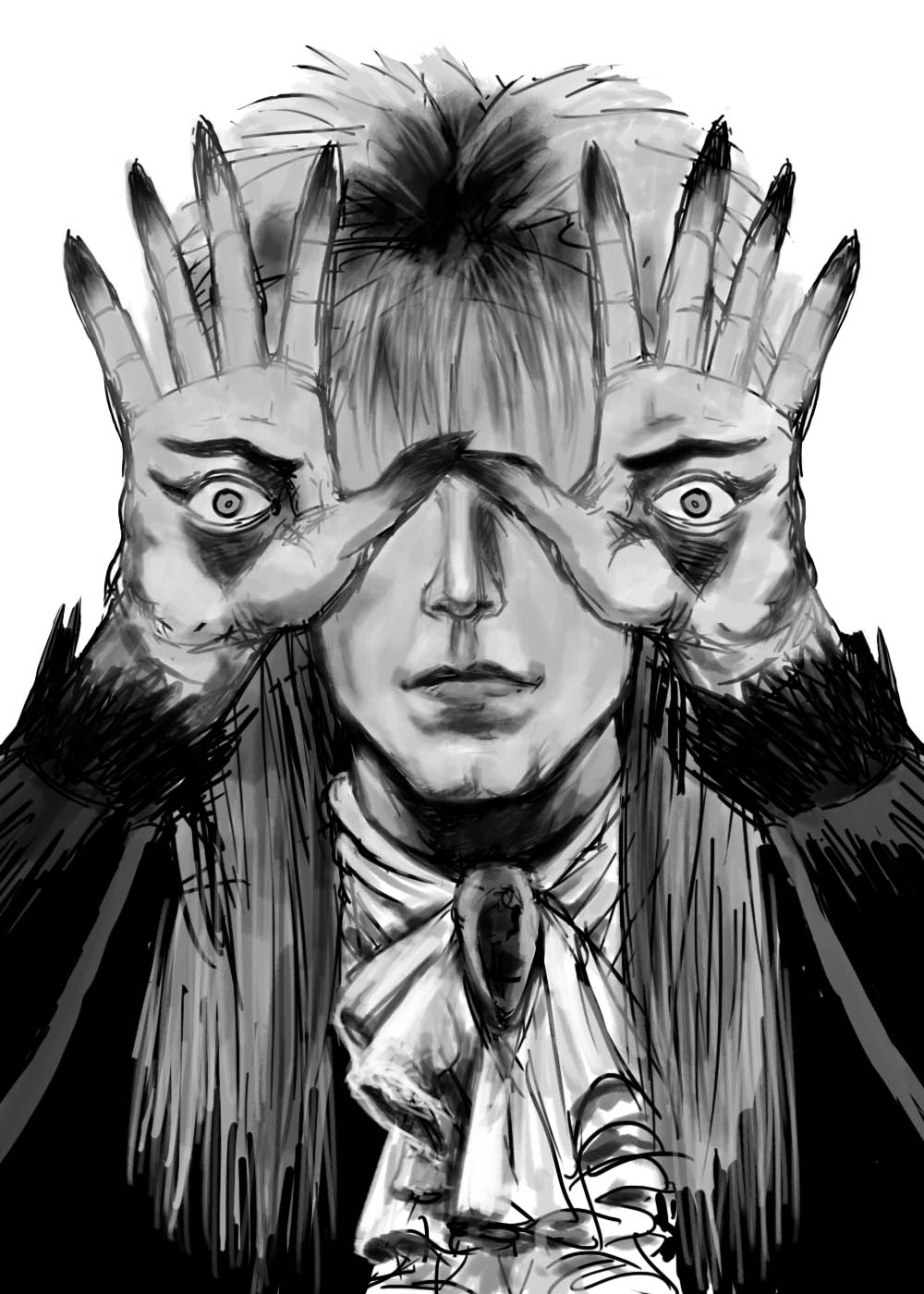
Pan's Labyrinth Starring David Bowie

Pan's Labyrinth Starring David Bowie


OK, this was an obvious mash-up of the Pale Man from "Pan's Labyrinth" and The Pale Duke, David Bowie, as Jareth from "Labyrinth".  I've had on my list of things to do for a while and given the recent news of Bowie's death, I figured I'd do it as a tribute.

I was a fan of his music, as well as acting.

* * *


STEP ONE: I did the digital pencils on a 1,000px x 1,400px canvas at 200dpi.

* * *


STEP TWO:  Next I laid down some rough values with a grayscale over-painting.  I really liked the sketchiness of the drawing at this point and almost left it at this stage and was tempted to just finish it as a black-and-white drawing.

* * *


STEP THREE:  After creating a MULTIPLY Layer, I laid down some flat coloring and decided to keep going with color.

* * *


STEP FOUR:  I created a bunch of NORMAL Layers--one for hands, one for the face, one of the hair, one for the clothes, etc. and added highlights and shadows to the flat color layer with a Oil Pastel brush in Photoshop.  And, yeah, I decided not to include Bowie's blown out pupil on his left eye (it looked--no pun intended--a little distracting).

* * *

This was done digitally in Photoshop.

.

Friday, January 8, 2016

A New Year, A New Hope...

HAPPY NEW YEAR - 2016!

A New Year, A New Hope...


Well, another year has come and gone with the usual mix of minor accomplishments and regrets.  I have made the usual retinue of resolutions to break for the New Year, and I'm sure y'all have done the same.  Here's to hoping all goes well for everyone!

I also want to take a few moments at the top of the new year to thank everyone for stopping by and gawking at my modest Blog, as well as the words of encouragement from many of you!  You are all much appreciated!  :-)

I have a stack of odd-sized, scrap pieces of hardboard which I gessoed.  From time-to-time, I'll grab one and paint a picture from a magazine that catches my eye, or something of the sort.  Nothing too fancy, just for warm-up or to try and work on some art skills for an hour or two.  Use it or lose it, don't ya know?  

In this case, it was a picture of Luke Skywalker from the original "Star Wars", which seemed like it would work on this Blog--I even thought of a semi-clever title and everything!  The painting was done with casein (it's sort of like acrylic paint, except it uses a milk-based protein as a binder) on a 4" x 5" gessoed hardboard, using a #10 Flat brush and #10 and #12 Round brushes. 

If I were smart (and I've never been accused of being such), I would have taken pictures/scans as I went along to show the progress, since many people like to see the process (I know I like seeing how they got from point "A" to point "B", myself).

If people like 'em enough, I may post more in the future.  We'll see, I guess.  :-)

* * *

Done with casein on 4" x 5" gessoed hardboard.

.

Wednesday, December 23, 2015

Merry Sithmas - Kylo Ren

MERRY SITHMAS!


Here's the final one in the set, featuring Kylo Ren (that's right, I can beat a joke into the ground with the best of 'em).  And, yes, I saw the movie on opening day... I would have lost all my precious, precious nerd cred if I hadn't, and they would have made me turn in my badge and secret decoder ring, no doubt.  :-)

I won't spoil anything other than to say if you like the Original Trilogy, you will probably like Star Wars: Episode VII: The Force Awakens.  (SPOILERS!  There is a new "Star Wars" movie out!)

* * *


STEP ONE:  Again, I used actual pencils on copy paper for the under drawing and extended the drawing (and holly) digitally.  I did a half-image, then duplicated and flipped it horizontally to save some time and to make sure it stayed symmetrical.  The image is 900px x 1260px.

* * *


STEP TWO:  The image was then inked digitally using a 5px brush for the most part.

* * *


STEP THREE:  I created a MULTIPLY Layer to colorize the drawing, and then added the lettering.  I also used the animated tab to create the animated, blinking stars in the .gif, above.

* * *

Done digitally in Photoshop.

.

Tuesday, December 22, 2015

Merry Sithmas - Darth Vader

MERRY SITHMAS


Hey, it's the third "Merry Sithmas", this time featuring Darth Vader.

* * *


STEP ONE:  This time I used actual pencils on copy paper for the under drawing, rather than just digital pencils (although, the Santa Hat was digitally added over top).  I did a half-image, then duplicated and flipped it horizontally.  The image is 900px x 1260px.

* * *


STEP TWO:  Here are the digital inks, done mostly with a 5px brush.

* * *


STEP THREE:  I created a MULTIPLY Layer to begin colorizing the drawing, and then added the lettering.  I also used the animated tab to create the animated .gif, above.

* * *

Done digitally with Photoshop.

.

Friday, December 18, 2015

Merry Sithmas - Darth Sidious

MERRY SITHMAS!


Here's the second in the "Merry Sithmas" series, featuring Darth Sidious.  I had just enough time to include the animated version with this post.  :-)

* * *


STEP ONE:  Here are the digital pencils, done on a canvas 900px x 1260px.

* * *


STEP TWO:  Here are the digital inks, done mostly with a 5px brush.

* * *


STEP THREE:  I created a MULTIPLY Layer to begin colorizing the drawing, and then added the lettering.  I also used the animated tab to create the animated .gif, above.

* * *

Done digitally with Photoshop.

.